
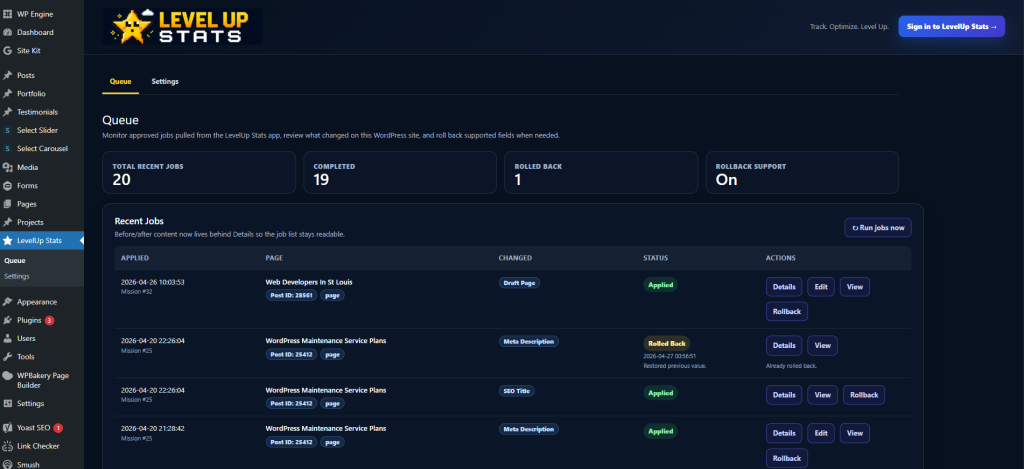
The Level Up Stats WordPress plugin connects your website directly to your Level Up Stats dashboard so you can move from “I know what needs to be fixed” to “the fix is actually done.”
Most SEO tools give you charts, warnings, keyword lists, and reports.
Level Up Stats is built differently. It turns your SEO work into clear missions, shows you what needs attention, and — when the WordPress plugin is installed — helps apply certain fixes directly to your site.
The goal is simple: Less guessing. Less copy/paste. More completed SEO work.
Frequently Asked Questions
The Level Up Stats WordPress plugin is a secure connector between your WordPress website and your Level Up Stats account.
Once installed, the plugin allows Level Up Stats to communicate with your WordPress site so supported SEO missions can be queued, previewed, applied, verified, and tracked.
Instead of only telling you that a page title, meta description, or on-page SEO item needs work, Level Up Stats can help you complete the fix through a guided workflow.
The plugin is designed for business owners, marketers, agencies, and site managers who want SEO improvements to feel more actionable and less overwhelming.
SEO is not usually hard because people do not care.
It is hard because the work gets scattered.
You may have one tool showing traffic, another showing keywords, another showing technical issues, another showing Google Search Console data, and another plugin controlling titles and meta descriptions.
Level Up Stats brings that work together into a mission-based dashboard.
The WordPress plugin adds the missing piece:
a way to help apply approved fixes directly to the website.
That means you are not just looking at SEO tasks. You are completing them.
The Level Up Stats WordPress plugin is built to support SEO improvements that can be safely managed from inside WordPress.
Supported features may include:
SEO Title Updates
Level Up Stats can identify pages where the SEO title could be improved. The plugin can help apply approved title updates to the correct WordPress page or post.
This is especially useful when a page is ranking but the title could be stronger, clearer, or more aligned with the search intent.
Meta Description Updates
Meta descriptions do not directly guarantee rankings, but they can influence how attractive your search result looks.
The plugin can help apply improved meta descriptions created through Level Up Stats missions.
Instead of manually copying text from a dashboard into WordPress, you can review the recommendation and apply the update through the plugin-supported workflow.
Mission Queue Support
When a mission is created inside Level Up Stats, supported fixes can be sent to your WordPress site as queued work.
This gives you a controlled process:
- Review the mission.
- Preview the recommended change.
- Approve the fix.
- Apply it through the plugin.
- Verify that the change is live.
This keeps the workflow organized and helps prevent random, untracked edits.
Before-and-After Tracking
One of the most important parts of the plugin is that it can help preserve the before-and-after details of supported changes.
That means Level Up Stats can track what was recommended, what was applied, and what the page looked like before the update.
This is important for accountability, rollback planning, and understanding which SEO improvements were actually completed.
Verification Before Rewards
Level Up Stats is gamified, but the rewards are not meant to be fake.
The plugin helps verify that supported fixes were actually applied before XP, coins, or mission completion rewards are awarded.
For example, if a mission asks you to update a page title and meta description, Level Up Stats should be able to compare the expected values against the live or stored WordPress values before marking the mission complete.
That keeps the system honest.
You earn progress by completing real SEO work.
Rollback-Friendly Workflow
SEO fixes should not feel risky.
For supported changes, the plugin is designed around a safer workflow where the original value can be stored before the new value is applied.
That makes it easier to review what changed and, when supported, roll back or restore previous values if needed.
Plugin-Supported Mission Indicators
Inside Level Up Stats, missions that can be handled through the WordPress plugin can be visually marked as plugin-supported.
This helps users quickly understand which missions can be applied more automatically and which ones still require manual work, strategy, writing, design, or development.
Not every SEO mission should be automated.
Some tasks require human judgment.
The plugin is designed to help with the fixes that make sense to automate while keeping the user in control.
The plugin works by creating a secure connection between your WordPress website and your Level Up Stats account.
Here is the general flow:
1. Your Data Is Pulled Into Level Up Stats
Level Up Stats can use connected data sources such as Google Search Console, Google Analytics, Google Business Profile, and other SEO inputs to understand how your site is performing.
This helps identify opportunities such as:
- Pages getting impressions but not enough clicks
- Keywords ranking close to page one
- Pages with weak titles or meta descriptions
- Content that may need refreshing
- SEO tasks that can be turned into missions
2. Level Up Stats Creates SEO Missions
Instead of handing you a giant report, Level Up Stats turns recommendations into missions.
A mission may say something like:
“Improve the SEO title and meta description for this page.”
or:
“Create a better landing page for this keyword opportunity.”
or:
“Review this page because it is getting impressions but not enough traffic.”
Each mission is meant to give you a clear next step.
3. Supported Missions Can Be Sent to WordPress
If the plugin is installed and connected, Level Up Stats can send supported fixes to your WordPress site.
This does not mean every fix happens automatically without your review.
The better workflow is:
recommend → preview → approve → apply → verify → reward
That keeps you in control.
4. The Plugin Applies the Approved Fix
When you approve a supported mission, the plugin can update the correct WordPress content or SEO field.
Depending on your site setup, that may include native WordPress fields or SEO plugin-managed fields.
The goal is to make the fix real on your website, not just marked complete inside a dashboard.
5. Level Up Stats Verifies the Change
After the plugin applies the fix, Level Up Stats can check whether the expected change is present.
Once the fix is verified, the mission can be marked complete.
That is when the user earns XP, coins, progress, or other rewards.
Most WordPress SEO plugins help you edit SEO data.
That is useful, but they usually do not tell you what to prioritize based on your actual performance data.
Level Up Stats approaches the problem from the other direction.
It looks at your site performance, finds opportunities, turns them into missions, and then uses the WordPress plugin to help complete supported fixes.
Traditional SEO plugins are often focused on fields.
Level Up Stats is focused on outcomes.
The plugin is not just another SEO settings screen. It is part of a larger workflow designed to help you keep improving the site over time.
No, not necessarily.
The Level Up Stats plugin is best understood as a connector and action layer.
If your website already uses an SEO plugin, Level Up Stats may work alongside it by helping manage supported SEO fields and recommendations through the mission system.
The purpose is not simply to replace your existing SEO plugin.
The purpose is to help you know what to fix next, apply approved improvements more easily, and verify that the work was completed.
The plugin is designed so completed fixes are real website changes, not just temporary plugin overlays.
That means when a supported title, meta description, or content-related update is applied, the change is intended to be saved to the site itself.
If you later uninstall the connector, completed fixes should not disappear simply because the connector is gone.
The plugin exists to help apply and verify improvements. It is not meant to hold your site hostage.
That is important.
Your SEO work should belong to your website.
Installing the plugin is similar to installing most WordPress plugins.
Step 1: Download the Plugin ZIP
From your Level Up Stats account, download the Level Up Stats WordPress plugin ZIP file.
Keep the file zipped. You do not need to unzip it before uploading it to WordPress.
Step 2: Log In to WordPress
Log in to your WordPress admin dashboard.
Usually, this is located at:
yourdomain.com/wp-admin
Step 3: Go to Plugins
In the WordPress admin menu, go to:
Plugins → Add New
Then click:
Upload Plugin
Step 4: Upload the Plugin ZIP
Choose the Level Up Stats plugin ZIP file from your computer.
Click:
Install Now
Step 5: Activate the Plugin
After the upload finishes, click:
Activate Plugin
Once activated, the plugin will be available inside your WordPress admin area.
Step 6: Connect the Plugin to Level Up Stats
Inside Level Up Stats, go to your website or property settings and look for the WordPress plugin connection details.
You may be given a connection key, token, or site-specific setup instructions.
Inside WordPress, open the Level Up Stats plugin settings and enter the required connection information.
Then click the button to test or verify the connection.
Step 7: Confirm the Connection
Once connected, Level Up Stats should be able to detect that the plugin is active.
Your dashboard may show a connected status, plugin-supported mission options, or a site health confirmation.
After that, supported missions can begin using the plugin workflow.
Once the plugin is installed and connected, most of the work happens inside Level Up Stats.
You do not need to live inside the WordPress plugin screen every day.
The typical workflow looks like this:
1. Open Your Level Up Stats Dashboard
Log in to your Level Up Stats account and select your website.2. Review Your Missions
Go to your missions area and review the recommended SEO tasks.
Look for missions marked as plugin-supported.
These are the missions that may be eligible for a more guided apply-and-verify workflow.
3. Open a Mission
Click into a mission to see the details.
You may see the current value, the recommended value, the reason for the recommendation, and the expected SEO benefit.
4. Preview the Fix
Before applying anything, review the suggested change.
For example, if Level Up Stats recommends a new meta description, read it first.
Make sure it sounds accurate, helpful, and aligned with your brand.
5. Apply the Fix
If the mission is plugin-supported, you can apply the approved fix through the connected WordPress plugin.
This sends the change to your WordPress site.
6. Verify Completion
After the fix is applied, Level Up Stats can check whether the change was completed correctly.
Once verified, the mission can be marked complete.
7. Earn XP and Track Progress
When the mission is completed, you can earn XP, coins, streak progress, or other rewards inside Level Up Stats.
This makes SEO feel less like a never-ending chore and more like a system you can keep improving over time.
The plugin is useful for many WordPress-powered websites, including:
- Local business websites
- Service business websites
- Marketing websites
- Agency-managed websites
- Small business websites
- Multi-page SEO websites
- Blogs and content-driven sites
- WordPress sites that need ongoing SEO improvements
It is especially useful for businesses that know SEO matters but struggle to consistently know what to fix next.
The plugin is a good fit for:
Business Owners
If you own a business and want SEO to feel less confusing, the plugin helps turn recommendations into clear actions.
Marketing Teams
If your team manages content and SEO but wants a better workflow, Level Up Stats helps prioritize improvements and track completed work.
Agencies
If you manage SEO for clients, the plugin can help standardize implementation, reduce repetitive manual updates, and show progress more clearly.
Website Managers
If you maintain a WordPress site and need a safer way to apply SEO changes, the plugin gives you a more structured workflow.
The plugin is designed around controlled, approved actions.
The goal is not to let random changes happen in the background without your knowledge.
A good SEO automation workflow should include:
- Secure connection
- User approval
- Clear previews
- Before-and-after records
- Verification
- Rollback awareness
- Disconnect options
Level Up Stats is built around that kind of workflow.
The plugin should only be connected to a Level Up Stats account you control or trust.
No.
The plugin should not require you to give Level Up Stats your WordPress admin password.
Instead, the connection should use a secure site token, key, or authenticated connector method.
That keeps the connection cleaner and safer than sharing administrator login credentials.
The Level Up Stats WordPress plugin is designed to close the gap between SEO recommendations and completed SEO work. It helps connect your WordPress site to your Level Up Stats dashboard, supports mission-based improvements, allows approved fixes to be applied, verifies completed work, and helps track real progress over time.
- For business owners, it makes SEO less overwhelming.
- For agencies, it makes implementation easier to manage.
- For marketers, it creates a cleaner workflow between data, action, and results.
- Level Up Stats turns SEO into a game you can actually win.
- The WordPress plugin helps make sure the work gets done.